Implementing DeBasher Programs
This section is devoted to explain the procedure of implementing new DeBasher programs. There are four main aspects involved. First, creating and configuring a new module to store the program and the different processes it executes. Second, implementing the processes themselves. Third, handling command-line and process options for the processes. And finally, incorporating the processes into the program.
More specifically, the implementation of a DeBasher program can be carried out in a process-wise manner. For each process, we will define a set of Bash functions governing the process behavior and its corresponding options. Option definition will implicitly define a network connecting the inputs and outputs of the different processes.
HINT: A wide range of DeBasher program examples can be found in the
data/programs folder after cloning the GitHub repository.
The following sections explain how to implement a simple program with
two processes: file_writer and file_reader. We will store the
program in the debasher_file_example module. The file_writer
process takes a string as input and writes it to a file. The
file_reader process takes this file and prints its content to the
standard output.
The whole code of the module will be added to a single file called
debasher_file_example.sh (the .sh extension is added because the
module will only contain Bash code).
A process graph generated with debasher_exec using its
--gen-proc-graph for the debasher_file_example.sh program would
look as follows:
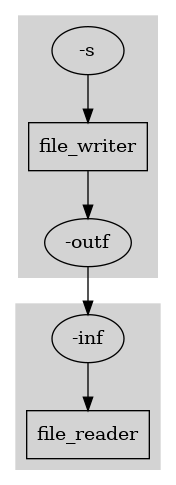
The graph shows the two processes involved in the program (using rectangles) as well as their input and output options (using ellipses) and how such options are connected, implicitly defining the program network.
Although it is not mandatory, it is recommended that the implementation is made in the same order in which the sections appear.
Module Configuration
The first step to implement DeBasher programs is to define the required
modules. In our example, there will only be one module, the
debasher_file_example module, which will be stored in the
debasher_file_example.sh file.
For a particular module, it is possible to define certain methods,
allowing to incorporate specific functionality. One example of this
would be to provide basic documentation about the module. To achieve
this goal, the document method can be defined:
debasher_file_example_document()
{
    local description="This module implements a simple program \
    with two processes, one writes a string to a file and the \
    other one reads it and prints it to the standard output."
    document_module "${description}"
}
One important tool to configure a particular module is to load other
modules. For this purpose, the load_debasher_module function can be
used.
For our example we do not need to load modules or further model configuration. However, for additional information about the module configuration API, please read the Module Configuration Section.
Process Implementation
The process constitutes the basic reusability unit of DeBasher. This means that a given process can potentially be used in multiple programs, while other elements such as the program network determined by the configuration of the process options are program-dependent.
A DeBasher process has a name, and it is implemented by means of a
function with such a name. For instance, if we want to implement the
file_writer process, we would start with the following code:
file_writer()
{
    # Add process code here
}
Process Naming and Namespaces
A process name must start with a letter or underscore, followed by any
number of letters, digits or underscores. Optionally, it can be
qualified with one or more namespace prefixes separated by dots (e.g.
namespace.name or org.namespace.name), where each dot-separated
part follows the same rule.
If you are implementing a module that you plan to share with other
people, it is strongly recommended that you qualify all of its process
names with a namespace of your own (for instance, the name of your
package or project). DeBasher does not keep any central registry of
namespaces, so uniqueness is not enforced by the tool itself; but
qualifying process names removes the most common source of accidental
clashes between unrelated modules, namely two of them defining a
process under the same short, generic name (such as download or
filter).
See the Namespace Example example for a module that reimplements
hello_world under the mymodule namespace, and
Namespace Example With Several Levels for the same module under the
org.mymodule namespace.
One exception: a process implemented in another language (Python, R,
Perl or Groovy) provides its code through a suffixed variable (legacy,
e.g. hello_world_py) or function (preferred, e.g.
hello_world_heredoc_py, a longer, more specific suffix than the
legacy variable’s, since it is reserved as a process method name).
Only the function form can be named after a namespaced process, since
a Bash variable name cannot contain a . (see Hello World Example in Python
versus its legacy, variable-based counterpart
Hello World Example in Python (Legacy)).
A DeBasher process can have input and output options, that are provided to the process as if it was a standard UNIX command.
So, when implementing a process, we should figure out the input and
output options it is going to work with. Such options should be read at
the very beginning of the process implementation. For this purpose, we
use the read_opt_value_from_func_args API function. This function
takes the name of a particular option and the input parameters of the
process being implemented, and returns the value associated to the
option.
Going back to the file_writer process, we want it to take a string
as input and write it to a file. As a result, it will receive two
options:
-s <string>: indicates the string that should be stored in a file.-outf <string>: determines the name of the file where the input string will be written.
It is important to stress out that in DeBasher, the name of the output
options should always start with -out or --out .
Given the two process options mentioned above, we can proceed with the
implementation of the file_writer process as follows:
file_writer()
{
    # Initialize variables
    local str=$(read_opt_value_from_func_args "-s" "$@")
    local outf=$(read_opt_value_from_func_args "-outf" "$@")

    # Add process code here
}
From this point, it is trivial to finish the code, since we only need to write the given string to the output file:
file_writer()
{
    # Initialize variables
    local str=$(read_opt_value_from_func_args "-s" "$@")
    local outf=$(read_opt_value_from_func_args "-outf" "$@")

    # Write string to file
    echo "${str}" > "${outf}"
}
On the other hand, the file_reader process should take a file name
as input and write its content to the standard output. Assuming that the
name of the input option is -inf, the implementation of the process
would look as follows:
file_reader()
{
    # Initialize variables
    local inf=$(read_opt_value_from_func_args "-inf" "$@")

    # Read string from file
    cat < "${inf}"
}
Process Documentation
Just like a module can define a document method to provide a short
description of itself (see the debasher_file_example_document
function shown in the Module Configuration Section), a process can
define its own document method using the document_process API
function. This is not mandatory, but it is recommended, since it allows
other users of the process to quickly understand what it does without
having to inspect its implementation.
For the file_writer and file_reader processes, the document
method would look as follows:
file_writer_document()
{
    document_process "Prints a string to a file."
}

file_reader_document()
{
    document_process "Reads a string from a file."
}
Option Explanation
Once a particular process has been implemented, it is necessary to ensure that it receives the input and output options it needs. Some of those options could be generated by other processes, but others may need to be provided in the command-line.
In this section we explain how process options are documented for a
DeBasher program. From the set of process options, some of them will
need to be provided via command-line. In particular, command-line
options should be provided when executing the program with
debasher_exec. If we execute debasher_exec with the
--show-cmdline-opts flag, a description of the process options that
should be provided through the command-line is displayed. This
description is collaboratively generated by the explain_opts method
implemented for the different processes.
Below we show the result of executing debasher_exec with the
--show-cmdline-opts flag for the debasher_file_example
module (only the part of the output related to the command-line options
is shown):
# Command line options for the program...
CATEGORY: GENERAL
-s <string> String to be displayed [file_writer]
In this case, the program defines one option, -s, for the
file_writer process. In addition to this, the process is also
provided the path of the output file by means of the -outf
option. It is worthy of note that -outf is not a command line option
that the user needs to provide. Instead, it is defined internally, based
on the output directory for the process.
In order to specify which options are to be provided through the
command-line, we should use another method: the
identify_cmdline_opts. This method should specify, from the set of
process options, which ones are command-line options for the program
being defined.
The resulting explain_opts and identify_cmdline_opts methods are
defined as follows:
file_writer_explain_opts()
{
    # -s option
    local description="String to be displayed"
    explain_opt "-s" "<string>" "$description"

    # -outf option
    local description="output file"
    explain_opt "-outf" "<file>" "$description"
}

file_writer_identify_cmdline_opts()
{
    opt_is_cmdline "-s"
}
HINT: every process needs an explain_opts method, even one with
no options at all, which can be just :. Besides documenting the
options, the method is what tells a process apart from any other
function of a module, and add_debasher_process refuses a process
without it (the older explain_cmdline_opts is also accepted).
On the other hand, the file_reader process will not require any
command line option. However, the process needs the path of an input
file. This path is not provided through the command line, but instead it
will be the output file generated by the file_writer process. As a
result, we define the corresponding explain_opts and
identify_cmdline_opts methods for the process as follows:
file_reader_explain_opts()
{
    # -inf option
    local description="input file"
    explain_opt "-inf" "<file>" "$description"
}

file_reader_identify_cmdline_opts()
{
    :
}
OBSERVATION: it should be noted that the only goal of the
explain_opts method is explaining (or documenting) the options of a
particular process. For a given process, its ``explain_opts`` method
never changes. However, the ``identify_cmdline_opts`` method for a
process may be different from one program to another.
IMPORTANT NOTE: a command-line option takes its value from the
command line and from nowhere else. When the process defines its options
(see below), an option marked with opt_is_cmdline or
opt_is_non_mandatory_cmdline can only be defined with
define_cmdline_opt or one of its variants
(define_cmdline_opt_if_given, define_cmdline_infile_opt,
define_cmdline_infile_opt_if_given, define_cmdline_indir_opt,
define_cmdline_indir_opt_if_given,
define_cmdline_flag_if_given), or not be defined at all when it is
optional and not given. debasher_exec stops with an error when a
process gives a command-line option a value of its own, and also when
identify_cmdline_opts marks an option that explain_opts does not
declare. When the tasks of a process need a value derived from a
command-line option, they should receive it through a different option.
Task shaping options: a command-line option may serve only to
decide the tasks of a process: the define_opts method (or the
generate_opts_size and generate_opts pair) reads it to know how
many tasks to define and what each one gets, and the process
implementation never receives it. Such an option is not declared in
explain_opts, which documents what each task receives, but in a
method of its own, explain_task_shaping_opts, with
explain_task_shaping_opt. For instance, the worker process of
the debasher_dynamic_fanout module reads the number of workers,
-w, to define one task per worker, and each task only receives its
own list of blocks:
worker_explain_task_shaping_opts()
{
    # -w option
    local description="Number of workers."
    explain_task_shaping_opt "-w" "<int>" "$description"
}
A task shaping option is always a mandatory command-line option, so it
is not marked in identify_cmdline_opts. debasher_exec stops
with an error when it is not given, before the options of the process
are defined, and also when a task of the process defines it, or when
the process declares it in explain_opts as well. A mandatory
command-line option of explain_opts that the first task of its
process does not receive gives a warning that suggests declaring it as
a task shaping option. debasher_exec --show-cmdline-opts lists a
task shaping option among the other command-line options, marked as
such, and debasher_doc_mod and debasher_exec_process show it in
a section of its own.
IMPORTANT NOTE: initially, only the command-line options of each
process were documented by means of the explain_cmdline_opt
method. However, such method is now deprecated and replaced by the
explain_opt method described above. The explain_opt method
documents all process options, no matter if they should be provided
through the command-line or not.
Option Definition/Generation
After implementing the process and documenting its command-line options, we can proceed to add the code that will specify the particular options that the process receives. This step, when completed for all of the processes, can be seen as defining the program network.
There are two alternatives to specify the process options, using the
define_opts method, or using the generate_opts method. The
second one is more suited to those situations where we define a task
array (see the Examples Section).
Alternative 1: Implement the define_opts method
Regarding the define_opts method, below it is shown a template of
the function that should be completed when defining the options for a
process called processname:
processname_define_opts()
{
    # Initialize variables
    local cmdline=$1
    local process_spec=$2
    local process_name=$3
    local process_outdir=$4
    local optlist=""

    # ADD CODE HERE...

    # Save option list
    save_opt_list optlist
}
The function receives four input parameters that can be used when necessary within the function. We store those input parameters into the following variables:
cmdline: contains a serialized version of the command-line options provided to the program. This variable will be useful to take the required command-line options and pass them to the process.process_spec: contains the process specification, including for instance the amount of memory and number of CPUs assigned to the process (the process specification is shown bydebasher_execbefore launching process execution). This information can also be relevant when defining the process options.process_name: this variable will contain the name of the process.process_outdir: this variable stores the full path of the output directory for the process.
Using the previous elements, the goal of the function is to create a
string in the optlist variable that ends up containing the options
that our program needs to receive. For this purpose, DeBasher provides
specific helper functions (See the API’s Option Definition/Generation Section).
IMPORTANT_NOTE: the variable used to store the option list should
always have the optlist substring as suffix. For instance,
my_optlist would be a correct name for the variable, but
list_of_options would not.
Let us assume that processname should work with the following
options:
-n: an integer value taken from the command line.-i: this option takes the value of the output option-outof another process calledprevious_process. This results in a program network whereprocessnameandprevious_processare connected.-outf: this option will store the name of the output file generated by the process. More specifically, we want to store this output in a file calledout.txtin the output directory ofprocessname.
Taking into account the previous requirements, the implementation of the
define_opts method for processname would look as follows:
processname_define_opts()
{
    # Initialize variables
    local cmdline=$1
    local process_spec=$2
    local process_name=$3
    local process_outdir=$4
    local optlist=""

    # -n option
    define_cmdline_opt "$cmdline" "-n" optlist || return 1

    # -i option
    define_opt_from_proc_out "-i" "previous_process" "-out" optlist || return 1

    # -outf option
    local filename="${process_outdir}/out.txt"
    define_opt "-outf" "${filename}" optlist || return 1

    # Save option list
    save_opt_list optlist
}
In the previous code snippet we have used three DeBasher API functions
which will add options to the optlist variable. At the end of the
function, optlist is saved by means of the save_opt_list API
function. The three new functions are:
define_cmdline_opt: this function copies the-noption given in the command line (the command line is stored in thecmdlinevariable) to theoptlistvariable.define_opt_from_proc_out: this function takes the value of the-outoption ofprevious_processand uses it to define the-ioption forprocessname. As a result, the output ofprevious_processwill be connected to the input ofprocessname.define_opt: this function takes as input the name of the option to be defined, its value and the name of the option list variable to store the result. In the example, it is used to define the option-outfwith a value determined by thefilenamevariable.
Alternative 2: Implement the generate_opts method
On the other hand, process options can also be specified by means of the
generate_opts method. This is more appropriate if we need to define
a task array, which will be composed of a certain number of tasks
specified in advance. The generate_opts method must be accompanied
by another one called generate_opts_size. The generate_opts_size
method should return a string representing the number of tasks that
compose the array, and the generate_opts method will be similar to
the define_opts one, but will define the options for the
\(i\)-th task within the array.
NOTE: task indices start at zero.
Below we show the templates for the generate_opts_size and
generate_opts methods given a process called processname.
processname_generate_opts_size()
{
    # Initialize variables
    local cmdline=$1
    local process_spec=$2
    local process_name=$3
    local process_outdir=$4

    # ADD CODE HERE...
    # local array_size=...

    echo ${array_size}
}

processname_generate_opts()
{
    # Initialize variables
    local cmdline=$1
    local process_spec=$2
    local process_name=$3
    local process_outdir=$4
    local task_idx=$5
    local optlist=""

    # ADD CODE HERE...

    # Save option list
    save_opt_list optlist
}
As it can be seen, both methods receive the same input parameters that
were defined for the define_opts method, with one exception. In
particular, the generate_opts method also receives the task index,
that in the template is stored in the task_idx variable.
Let us assume that processname is an array of 10 tasks and we want
that each task receives an option called -id defining the index of
the task. The required code would be as follows:
processname_generate_opts_size()
{
    # Initialize variables
    local cmdline=$1
    local process_spec=$2
    local process_name=$3
    local process_outdir=$4

    local array_size=10

    echo ${array_size}
}

processname_generate_opts()
{
    # Initialize variables
    local cmdline=$1
    local process_spec=$2
    local process_name=$3
    local process_outdir=$4
    local task_idx=$5
    local optlist=""

    # -id
    define_opt "-id" "${task_idx}" optlist || return 1

    # Save option list
    save_opt_list optlist
}
The define_* functions work the same in define_opts and in
generate_opts: the engine knows the task whose options are being
defined, so a generator declares a FIFO with define_fifo_opt and a
value descriptor with define_value_desc_opt, as define_opts
does, and each task gets its own. The older
define_fifo_opt_generator, which takes the task index as an
argument, still works, and ignores that argument.
The two alternatives differ in when the options are computed.
define_opts runs once, when the run is prepared, and the engine
keeps the option list of every task until the task runs. A generator
keeps nothing: the engine calls generate_opts again whenever it
needs the options of a task, inside the task too, so it has to give
the same option list every time for the same command line and task
index. The engine does not check it. A generator that reads a file or
a directory, such as one given on the command line to say how many
tasks there are, relies on it staying unchanged while the run lasts
(while the program runs, in a resident program): do not modify the
files that shape the tasks during a run. A process whose option lists
have to be fixed when the run is prepared uses define_opts
instead.
A process whose tasks match those of another process, one by one, or
whose task reads every task of another process, does not compute that
number of tasks again: get_process_num_tasks gives it. The engine
defines the options of the processes without a generator before those
of the processes with one, so a generator can ask for the number of
tasks of any process, and a process without a generator only for that
of a process with one. In the following example the consumer has as
many tasks as the producer, which counts the lines of a file given
with -f:
consumer_generate_opts_size()
{
    get_process_num_tasks "producer"
}
When the number is read into a variable, a failure, such as a cycle of processes whose numbers of tasks depend on each other, has to stop the method that reads it:
local n
n=$(get_process_num_tasks "producer") || return 1
A Directory of Its Own for Each Task
The implementation of a process should not depend on how many tasks it
has: a process written to run once should also work as an array,
without changes. A process with a single task finds its output
directory empty when it starts, since DeBasher empties it, but the
tasks of an array share the output directory of their process, which
is not emptied before each of them. define_opt_from_process_outdir
gives an option the path of the output directory of the process and,
with --subdir, that of a subdirectory of it for the task, which
DeBasher creates before the process runs and empties before each task
runs:
define_opt_from_process_outdir "-outd" optlist --subdir "${task_idx}" || return 1
The process function then finds the directory given in -outd
there and empty, with one task or with many, and can write files of
fixed names into it. A reset_outfiles method, when the process has
one, replaces the emptying. Two tasks may not ask for the same
subdirectory, and no subdirectory may be below another one of the same
process.
A task may still receive its index as an option when the index is data
of its work, such as which part of an input it takes, but not to
choose where it writes or to keep clear of the other tasks: that is
what a subdirectory of its own, or an output option of its own, is
for. To gather what every task wrote, a process reads it through a
fanout family, one option per task, which also makes it wait for every
task (see the debasher_shared_subdir_example example in
Examples).
An output directory for which some task asks for a subdirectory belongs to those subdirectories: when the process is prepared to run, DeBasher removes from it everything that is neither a subdirectory that a task of the run asks for nor a path that an output option of the run names (such as a value descriptor), so that the subdirectories of tasks that the process no longer has go away. A task therefore writes only into its own subdirectories, or into paths that its output options name.
Option Definition for debasher_file_example
Going back to our debasher_file_example module, the file_writer
and file_reader processes are not going to execute task arrays, so
we will define the define_opts method for both.
Regarding the file_writer process, as it was mentioned above, it
will work with following options:
-s: indicates the string that should be stored in a file.-outf: determines the name of the file where the input string will be written.
Thus, the definition of the -s option will require the use of the
define_cmdline_opt API function to get the parameter given in the
command-line, and the definition of the -outf option will require
the use of the define_opt API function:
file_writer_define_opts()
{
    # Initialize variables
    local cmdline=$1
    local process_spec=$2
    local process_name=$3
    local process_outdir=$4
    local optlist=""

    # -s option
    define_cmdline_opt "$cmdline" "-s" optlist || return 1

    # Define option for output file
    local filename="${process_outdir}/out.txt"
    define_opt "-outf" "${filename}" optlist || return 1

    # Save option list
    save_opt_list optlist
}
On the other hand, the file_reader process will only work with one
option:
-inf: name of the file whose content will be printed to the standard output.
In this case, the definition of the -inf option for the
file_reader process requires to connect it with the output of the
file_writer process using the define_opt_from_proc_out API
function:
file_reader_define_opts()
{
    # Initialize variables
    local cmdline=$1
    local process_spec=$2
    local process_name=$3
    local process_outdir=$4
    local optlist=""

    # Define option for input file
    define_opt_from_proc_out "-inf" "file_writer" "-outf" optlist || return 1

    # Save option list
    save_opt_list optlist
}
HINT: it is useful to debug the correctness of option definition by
using the --check-proc-opts option of debasher_exec. This option
will stop execution after displaying the options received by each
process.
$ debasher_exec --pfile debasher_file_example.sh --outdir out -s "Hello World!" --check-proc-opts
The option information part of the output of the previous command will be:
# Checking process options...
PROCESS: file_writer ; NUM_TASKS: 1 ; OPTIONS: -s Hello\ World\! -outf <path_to_out_dir>/out/file_writer/out.txt
PROCESS: file_reader ; NUM_TASKS: 1 ; OPTIONS: -inf <path_to_out_dir>/out/file_writer/out.txt
Program Definition
Once the processes involved in our program have been implemented including the specification of their optins, we can proceed with the definition of the program itself.
Defining a program is extremely simple. For this purpose, we only need
to implement the program method for the debasher_file_example
module. This method will incorporate into the program the processes to
be executed. To add a process to a program we can use the
add_debasher_process function:
debasher_file_example_program()
{
    add_debasher_process "file_writer" "cpus=1 mem=32 time=00:01:00"
    add_debasher_process "file_reader" "cpus=1 mem=32 time=00:01:00"
}
When adding a process to a program, we can provide information about the
resources that the process requires. In the given example, both the
file_writer and the file_reader processes will require 1 CPU,
32MBs of RAM a 1 minute for their execution.
When defining a program, it is also possible to add another
programs. This can be achieved by means of the add_debasher_program
API function. An example of this is provided in the Examples
Section.
Further Process, Program and Module Characterization
The program defined by the debasher_file_example module only uses
the most basic functionality provided by DeBasher. However, as it was
mentioned above, DeBasher works with three main entities: processes,
programs and modules, and it offers multiple alternatives to fully
characterize them.
Module Methods
Besides the process-level document method described above, a
DeBasher module can define its own methods, similarly to a process (see
Process Methods below):
document: describes the module itself, usingdocument_module(see Module Configuration above).program: incorporates processes into the program, usingadd_debasher_process(see Program Definition above), and/or whole programs defined by other modules, usingadd_debasher_program(see Reusing Processes and Programs below).shared_dirs: not shown so far, declares one or more directories shared by several processes, usingdefine_shared_dir:debasher_shared_dir_example_shared_dirs() { define_shared_dir "data" }
A shared directory declared this way is created once, before any process in the program executes, and its absolute path can then be retrieved from any process’s own methods by means of
get_absolute_shdirname(e.g.get_absolute_shdirname "data"). This lets two processes agree on a common directory without one having to pass it to the other as a regular connected option.A process can also get the path of a shared directory as an option, with
define_opt_from_shared_dir(e.g.define_opt_from_shared_dir "-datadir" "data" optlist). With--subdir, the option gets instead a subdirectory of its own, whichdebasher_execcreates before any process executes. The usual subpath is the index of the task, so that the tasks of an array do not overwrite each other’s files:define_opt_from_shared_dir "-outd" "data" optlist --subdir "${task_idx}" || return 1
A shared directory for which some option asks for a subdirectory belongs to its subdirectories: each run removes from it everything that is not a subdirectory that an option of the run asks for, or a directory on the way to one, such as the subdirectories of tasks that the program no longer has. A task therefore writes only into its own subdirectory, and an output option that holds the whole shared directory is refused; reading the whole directory, through an input option, is allowed.
program_type: declares the type of the program, usingprogram_type, eithergeneral(the default, when the module defines no such method) orresident:webui_running_sum_program_type() { program_type "resident" }
A general program is the kind described in this section, whose processes run once and end. A resident program is made of long-lived, stateful Python processes (see the Resident DeBasher Programs Section). Only the type declared by the module given to
debasher_execcounts: a module loaded by it to reuse its processes or its program has its ownprogram_typemethod ignored.
Once a module (and/or its processes) defines any of these methods, the
debasher_doc_mod tool can be used to generate Markdown
documentation for it directly from its code, without having to read
through the module’s own source file:
$ debasher_doc_mod -m debasher_file_example.sh -s file_writer \
    --show-opts --show-opthnd --show-impl --show-specs --show-meths
The -m option gives the module file, and the optional -s option
restricts the output to a single process (omit it to document every
process the module defines). Each --show-* flag adds one more
section to the report: --show-opts/--show-opthnd/--show-impl
show, respectively, the process options (as documented by
explain_opts, followed by the task shaping options, if any), the
option-handler method actually used
(define_opts, or the generate_opts_size/generate_opts
pair), and the process implementation itself; --show-specs shows
its computational and additional specifications (see Process
Specifications below); --show-meths lists, by name, every method
from Process Methods below that the process actually defines.
Passing --show-meths-with-code instead of --show-meths (or
--show-vars-with-values instead of --show-vars, for a
non-Bash implementation) prints each one’s full definition rather than
just its name. Run debasher_doc_mod --help for the complete list of
flags.
Process Methods
Besides the methods already covered above (document,
explain_opts, explain_task_shaping_opts,
identify_cmdline_opts,
define_opts/generate_opts_size/generate_opts, and the
process implementation itself), a process may define a few more
methods to further characterize its behavior. All of them are
optional, and DeBasher falls back to a sensible default whenever one is
missing.
reset_outfiles: run instead of DeBasher’s default output directory cleanup, right before the process implementation itself. It receives the exact same options as the implementation, so it is defined the same way:array_writer_reset_outfiles() { # Initialize variables local outf=$(read_opt_value_from_func_args "-outf" "$@") # Remove output file if [ -f "${outf}" ]; then rm "${outf}" fi }
(taken from the
arrayexample, wherearray_writeruses it to remove a stale output file from a previous run before recreating it.)post: run right after the process implementation returns, whether it succeeded or failed, e.g. for post-processing or cleanup. It does not run when the implementation ends the whole task, by callingexitor by being killed by a signal. It also receives the same options as the implementation:array_reader_post() { logmsg "Cleaning directory..." # Initialize variables local outd=$(read_opt_value_from_func_args "-outdir" "$@") # Remove auxiliary file rm "${outd}"/aux logmsg "Cleaning finished" }
(also taken from the
arrayexample, this time fromarray_reader.)skip: decides, from the process’s own options, whether to skip running it entirely for a given execution. Returning 0 means the process is skipped; any other exit code lets it run normally. A skipped process counts as finished: its output directory is left as it is, neither the process nor itspostmethod run, and the processes that depend on it run with the outputs it already has. It is decided task by task for an array. Like a process that ran, a skipped one is not evaluated again by later executions unless it has to run again (for instance, because its options changed). A process at either end of a FIFO should not be skipped, since the process at the other end would wait forever for it to open the FIFO.value_reader_skip() { # Initialize variables local value=$(read_opt_value_from_func_args "-val-desc" "$@") # Skip if the read value is odd if ((value % 2 == 1)); then return 0 else return 1 fi }
(see the
skipexample for the full module.)define_opt_deps: changes the type of the dependency that DeBasher infers from one option on the process that produces its value. It receives the name of the option and the name of that process, and prints the type to use instead,noneto have no dependency, or nothing to keep the inferred one. By default, an option connected to a file givesafterok(aftercorrwhen both processes are arrays and the option reads the task with the same index), and an option connected to a FIFO gives no dependency, so that both ends of a FIFO start together:stream_report_define_opt_deps() { # Initialize variables local opt=$1 local producer_process=$2 case ${opt} in "-inf") echo "afterany" ;; *) echo "" ;; esac }
(see the
define_opt_depsexample, where a report runs whether the process it reads from succeeded or failed, and a FIFO reader is launched once its writer has started.)outdir_basename: echoes the basename to use for the process’s own output directory, instead of the default (the process name itself):my_process_outdir_basename() { echo "my_custom_dirname" }
conda_envs: declares the Conda environments the process needs, using thedefine_conda_envfunction (given an environment name and a.ymlfile). When the program runs with--conda-support, DeBasher creates the environment if it does not exist yet, and the process implementation, which activates it withconda_activate, can just assume it already exists:conda_example_conda_envs() { define_conda_env py27 py27.yml }
(see the
condaexample.)docker_imgs: declares the Docker images the process needs, using thepull_docker_imgfunction. When the program runs with--docker-support, DeBasher pulls the image before the process executes, and the process runs it with"${DOCKER}":docker_example_docker_imgs() { pull_docker_img "library/hello-world" }
(see the
dockerexample.)
Unlike reset_outfiles/post/skip, the outdir_basename,
conda_envs and docker_imgs methods take no input parameters,
and each of the latter two is only run once per process, regardless of
how many tasks it executes.
Process Specifications
The second and third arguments of add_debasher_process (see
Program Definition above), the process’s computational and
additional specifications, accept a few more attributes besides the
cpus/mem/time ones already shown.
Computational specifications (space-separated attribute=value
pairs, second argument):
cpus,mem,time: number of CPUs, amount of RAM (in MBs) and wall-clock time budget assigned to the process.nodes,account,partition: SLURM-specific scheduling attributes (number of nodes, billing account, and partition/queue to submit to), only meaningful when running under the SLURM scheduler.throttle: caps how many tasks of an array/generator process are scheduled at the same time.
HINT: under the SLURM scheduler, mem and time may each be
given as a comma-separated list (e.g. time=00:01:00,00:02:00, as
used by the array example) to give increasingly generous budgets to
successive retry attempts of the same process, instead of a single
fixed one.
Additional specifications (;-separated attribute=value pairs,
third argument):
force: set toyesto force the process to always rerun, even if DeBasher would otherwise consider it already completed.processdeps: explicit dependencies on other processes (e.g.afterok:other_process,aftercorr:other_process,none, …), needed when a dependency is not already implied by an option connection. They replace the dependencies DeBasher would infer from the options, instead of adding to them. See theexplicit_deps/host_workflow_expl_depsexamples. The types are those of Slurm:after(the other process started),afterok(it finished successfully),afternotok(it failed),afterany(it finished either way) andaftercorr(between two arrays, each task waits for the task with the same index of the other process to finish successfully). Both schedulers runaftercorrtask by task: a task starts as soon as its own counterpart has finished, while other tasks of the other array still run or after some of them have failed (see theaftercorrexample). A task with no counterpart, because one of the two processes is not an array or the other array has fewer tasks, waits for every task of the other process. A task whose dependencies can no longer hold in the run (for instanceafterokon a process that failed, oraftercorron a task that failed) is cancelled instead of left waiting: it counts as a failed task, so that its process ends andafteranyandafternotokon it hold, and the next run tries it again. Under the built-in scheduler, a.cancelledfile in the exec directory of its process (__exec__/<process>) says which dependency could not hold.alias/ext_alias: reuse another process’s implementation (one already defined in the same module tree, or an external script file, respectively) as this process’s own, instead of providing one directly. See thehello_world_alias/hello_world_ext_aliasexamples.alias_opt_map: only valid alongsidealias/ext_alias: a comma-separated list ofOLD:NEWoption-label pairs, renaming this process’s own option names into the ones the aliased implementation expects. See thealias_opt_mapexample.
For the exhaustive, authoritative description of every attribute, see
the add_debasher_process entry in the Program Definition Section.
Further Information
Instead of incorporating additional detailed explanations here, it can be more useful to provide a list of examples exploiting different aspects of the Debasher’s functionality. Such examples are described in the Examples Section.
Steps and Sequential Processes
The dependency graph of a program is fixed before it runs, but some processes only know what to run next while they run: a loop that sends each value it reads to one of two transformations, or a process that skips its second stage when the first one produced nothing. Such a process runs its stages itself, as steps, from its own implementation.
Running a step
seq_execute <function> <args> runs a function, or a command, waits
for it to end and returns an error if it fails. The
debasher_telegram_imperative example (see Examples) runs two
functions of another module this way, and skips the second one when the
first produced no words:
seq_execute decomposer -f "${file}" -outf "${outd}"/words.txt || return 1
...
seq_execute recomposer -c "${char_lim}" -inf "${outd}"/words.txt -outf "${outd}"/output.txt || return 1
The step runs in the shell of the task, whatever the scheduler of the
program, so a step that calls exit ends the whole task, as the
implementation of a process would. Under the SLURM scheduler it runs
inside the allocation of the job of the task. A sequential process can
send its steps to SLURM instead, with sched=SLURM (see
Sequential processes below). seq_execute_slurm sends a step to
SLURM, through srun, whatever the scheduler of the program.
The arguments reach the function as they are given, positional or
options. What the step prints to its standard output goes to that of
seq_execute, and so to the .stdout file of the task unless the
caller captures it; its standard error goes to the log of the task.
HINT: the step reads the standard input of the call. Inside a loop
that reads its own standard input, such as while read, give the
step /dev/null (seq_execute f "$x" < /dev/null): a step that
reads its standard input would take the rest of the loop’s input, and
a step sent to SLURM takes it whether it reads it or not, since srun
does.
Sequential processes
Any function of the program can run as a step. Declaring it as a
sequential process, with add_debasher_seq_process in the
program method, is needed only when its code is not a Bash function
(a heredoc in Python, R, Perl or Groovy), when it borrows the code of
another process or of an external script (alias, ext_alias), or
when its steps go to SLURM, with resources of their own. The
debasher_cycle_dyn_sched module in data/programs does it for a
transformation written in Python, which its worker process runs as
a step on SLURM, although the program, which uses FIFOs, runs on the
built-in scheduler:
transformation_b_heredoc_py()
{
    cat <<'EOF'
import sys
value = int(sys.argv[1])
fname = sys.argv[2]
with open(fname, 'w') as f:
    f.write(str(value + 2))
EOF
}

worker()
{
    ...
    seq_execute transformation_b "${value}" "${outd}/transformation_result.txt"
    ...
}

debasher_cycle_dyn_sched_program()
{
    add_debasher_process "master" "cpus=1 mem=32 time=00:10:00"
    add_debasher_process "worker" "cpus=1 mem=32 time=00:10:00"
    add_debasher_seq_process "transformation_b" "cpus=1 mem=32 time=00:01:00" "sched=SLURM"
}
add_debasher_seq_process takes the same arguments as
add_debasher_process, with these differences:
Every computational specification is optional. When a step goes to SLURM,
cpus,mem,time,nodes,accountandpartitionbecome options ofsrun; a step in the shell of the task uses none of them. Inside a SLURM job, a step gets its resources from the allocation of the job, and one that asks for more than the job has fails.throttleand a list of values inmemortimeare refused, since a step runs once.Of the additional specifications,
alias,ext_aliasandalias_opt_mapmean what they mean for a process;processdepsandforceare refused.sched, which only a sequential process has, names whereseq_executeruns its steps:BUILTIN(the default) in the shell of the task, whatever the scheduler of the program, orSLURMthroughsrun.debasher_execrefuses to start a program withsched=SLURMon a machine withoutsrun, andseq_execute_slurmrefuses a sequential process withsched=BUILTIN.A sequential process needs no method besides its implementation (no
explain_opts,define_opts, …): DeBasher never schedules it, and it has no options, tasks or status of its own.Its name cannot be that of a process or of another sequential process.
A resident program cannot have sequential processes (see Resident DeBasher Programs).
HINT: a module meant to run on machines without SLURM leaves
sched=SLURM out, and calls seq_execute rather than
seq_execute_slurm: its steps then run anywhere.
The debasher_seq_process_example example (see Examples)
runs two sequential processes with seq_execute: one in Python, and
one alias of a sequential process in Bash. debasher_doc_mod --show-seq-procs
documents the sequential processes of a module, after its processes.
Recording finished steps
DeBasher keeps no record of a step: when a task fails halfway through
its steps, the next run runs all of them again. A process that wants to
skip the steps that an earlier run finished records them itself, with
mark_step_done <dir> <id>, which creates an empty marker file for
the step, and is_step_done <dir> <id>, which tells whether it
exists. The debasher_dynamic_fanout_stepdone module in
data/programs runs one step per file of its list:
local sum
sum=$(cksum < "$filepath" | awk '{print $1}')
local stepid="${base}_${sum}"

if is_step_done "${outd}" "${stepid}"; then
    echo "Step ${stepid} was already completed and marked as done" >&2
else
    rm -f "${outd}/${DEBASHER_STEP_MARKER_PREFIX}${base}_"*
    if seq_execute worker_task "$filepath" "$outd/$base" < /dev/null; then
        mark_step_done "${outd}" "${stepid}" || return 1
    else
        exit_code=1
    fi
fi
Two things are left to the process:
The markers have to survive. A process with a single task has its output directory emptied when it starts, and a task its subdirectory given with
define_opt_from_process_outdir --subdir, unless the process has areset_outfilesmethod that keeps them; the example defines one that does nothing.A marker has to stop counting when the work changes. A process that runs again because its options or its inputs changed still finds the markers of the earlier run. The example puts a checksum of the input in the id, so that a changed input has a new id, and removes the markers that other inputs left for the same output before it runs the step, so that an input that comes back does not find an old marker for an output that was overwritten since.
Reusing Processes and Programs
Code reuse is a fundamental element of DeBasher. As it was explained above, the basic reusability unit is the process. This does not include the configuration of process options (i.e. the program network), since it may be highly dependent on the particular program.
When implementing a new program, we can use the load_debasher_module
API function to load previously implemented modules. This function will
load all of the functions characterizing the processes participating in
the loaded modules.
HINT: when executing the load_debasher_module API function, the
modules will be loaded from the current directory if they
exist. Otherwise, they are searched in the directories indicated in the
DEBASHER_MOD_DIR environment variable (using the : symbol as
separator). The program file given to debasher_exec is looked for in
the same way.
After loading the required modules, the option related code can be modified just by redefining the corresponding functions.
For instance, let us assume that we want to create an alternative
version of the debasher_file_example module discussed above. In the
new version, the file_writer program no longer reads the input
string from the command line, but it always print the “Hello World!”
string to the output file.
If we create a new module called debasher_file_example_alternative,
we would only need to put the following code in the
debasher_file_example_alternative.sh file:
load_debasher_module "debasher_file_example"

file_writer_identify_cmdline_opts()
{
    :
}

file_writer_define_opts()
{
    # Initialize variables
    local cmdline=$1
    local process_spec=$2
    local process_name=$3
    local process_outdir=$4
    local optlist=""

    # -s option
    define_opt "-s" "Hello World!" optlist || return 1

    # Define option for output file
    local filename="${process_outdir}/out.txt"
    define_opt "-outf" "${filename}" optlist || return 1

    # Save option list
    save_opt_list optlist
}

debasher_file_example_alternative_program()
{
    add_debasher_process "file_writer" "cpus=1 mem=32 time=00:01:00"
    add_debasher_process "file_reader" "cpus=1 mem=32 time=00:01:00"
}
As it can be seen, only the option-related code of the file_writer
required modification (the code related to the file_reader process
remains unchanged). In particular, the -s option is no longer a
command-line option, which is specified by means of the
identify_cmdline_opts. The explain_opts method is unchanged,
since the file_writer process still receives the -s option, but
it is no longer provided by the user through the command-line.
Another way to reuse code would be to add whole programs when defining
the program method. For this purpose, we could use the
add_debasher_program API function, as it was explained in the
Program Definition Section.
Examples
Below we show a list of DeBasher program examples exploring the
functionality offered by the tool, in the same order in which they are
checked by the debasher_check_installation script. The examples can
also be found in the data/programs folder after cloning the GitHub
repository.
- Namespace Example
- Namespace Example With Several Levels
- Hello World Example in Python
- Hello World Example in Python (Legacy)
- Hello World Alias Example
- Hello World External Alias Example
- Alias Option Map Example
- Program with Cycles
- Value Pass Example
- Process Skip Example
- Explicit Process Dependencies Example
- Process Array Example
- Process Array Example Using the Array Option Handler
- File Writer and File Reader Example
- FIFO Writer and FIFO Reader Example
- Option Dependencies Example
- Process Array Example using Generators
- FIFO Array Example using Generators
- Shared Subdirectories Example
- Aftercorr Example
- Subprogram Example
- Host Workflow Example
- Host Workflow Example With Explicit Dependencies
- Host Workflow Example With Forced Execution
- Telegram Example
- Telegram Example Using Job Steps
- Telegram Example Using an Imperative Style
- Sequential Processes Example
- Telegram Example Using Four Pipeline Stages
- Conda Example
- Docker Example
- Dynamic Fanout Example
- Dynamic Fanout Example Using FIFOs
- Dynamic Fanout Example Using FIFOs and Generators